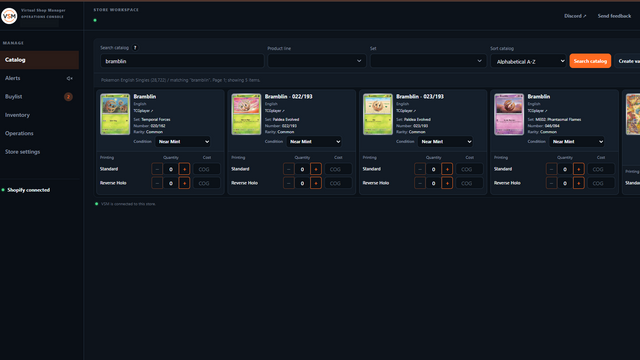
Search your catalog
Search enabled product lines by title, set, number or rarity. Select the exact printing and condition before adding stock.
 Virtual Shop Manager
Home / TCG Inventory Management for Shopify
Virtual Shop Manager for Shopify
Manage trading card listings, stock and costs in one place, connected to Shopify.
Search enabled product lines by title, set, number or rarity. Select the exact printing and condition before adding stock.
Prepare listings with quantities, costs, images and your store’s saved product details. Choose Active, Draft or Unlisted.
Stage quantity, retail price, unit cost and shipping-weight changes, then save the selected edits after VSM rechecks Shopify.
Use an unconnected Shopify item as a template. Copy permitted details, tags and manual collections, then enter your own title, description, cost, price and weight. The new item remains an unconnected Draft with zero stock; automatic collections follow Shopify’s rules.
Open the inventory-value report in Operations, choose KPI cards and filter recorded retail value, cost and stock across the stated VSM inventory scope. Breakdowns and snapshot warnings show what is known, missing or unclassified. The report does not change your inventory.
For supported sealed products, choose “Styles may vary” when customers will receive a random style rather than selecting one.
Review unclear catalog identities and possible duplicate listings. A product must match the correct printing and condition before it is connected.
Core and opt-in beta lines cover Singles and Sealed. See the full product-line list or follow the setup overview.
See screenshots, pricing and merchant reviews on the Shopify App Store.